
In this guide
Related guides
What is a Wi-Fi heatmap?
A heatmap colors your floor plan by signal strength, so you can see weak spots and dead zones before your team complains about them. Walls, glass, metal and furniture all weaken the signal, and the map shows exactly where.
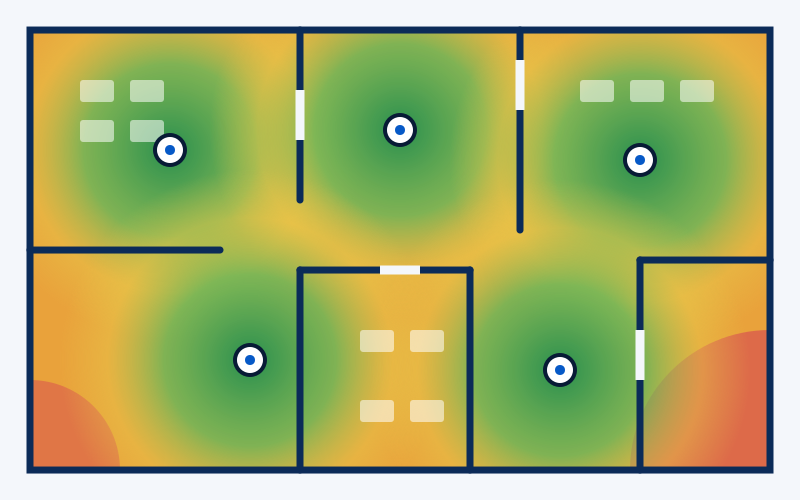
- Strong signal
- Fair signal
- Weak signal
How many access points do I need?
- It depends on how many people use the Wi-Fi and on the type of walls, not only on floor area.
- An open office with fewer than about 25 users is often well served by one well-placed access point.
- Concrete, brick or metal walls, or more people using video and large files at the same time, mean more access points.
- The exact number and positions are set by a Wi-Fi survey of your site.
Why does Wi-Fi feel bad?
These are the three complaints we hear most:
- Slow speeds
- Often too many people on one access point, or old equipment.
- Dead zones
- Walls and distance block the signal in some rooms.
- Frequent disconnections
- Often a weak signal at the edge of coverage, or interference.
Our Wi-Fi survey
- We visit your site and inspect it, then show you a heatmap of where access points should go and how well each area is covered.
- The Wi-Fi survey is a paid service. The site visit before the quote is free.
- Every access point is cabled back to the network, so we plan the Wi-Fi and the cabling together.